밤샘팟 - 되돌릴 수 없는 것들
미니앱 배포의 되돌릴 수 없는 동작 앞에서 만든 습관 정리. 제출 전 기계 검사와 승인, 승인난 번들의 폐기 판단, 미리보기로 시작한 SDK 전환, 문서보다 실제 시스템을 우선하는 원칙까지.
앞의 두 글(캐릭터, 실기기)이 코드 이야기였다면 이번은 절차 이야기.
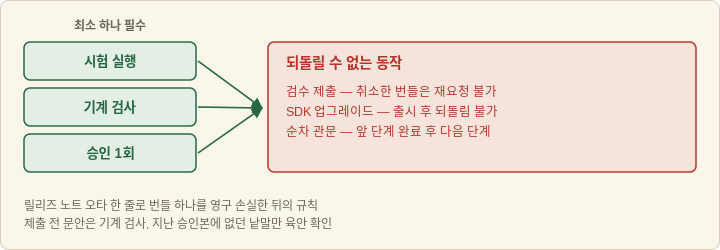
미니앱 배포에는 되돌릴 수 없는 동작이 여럿 존재. 한 번 무르면 다시 못 올리는 제출, 한 번 올리면 이전 버전으로 못 내려오는 런타임, 앞 단계가 끝나야 뒤 단계를 시작할 수 있는 순차 관문.
비가역성은 코드 문제가 아니라 순서와 절차의 문제. 앱 하나를 출시하고 세 번 업데이트하며 그 성질에 맞춰 만든 습관의 기록.
제출 앞의 한 번 정지
출시 첫 주에 번들 하나를 영구 손실. 릴리즈 노트 오타 때문에 검수를 취소했는데, 취소한 번들은 재요청 불가. 코드는 정상, 원인은 문안 한 줄.
그 뒤로 릴리즈 노트는 제출 전에 기계 검사. 맞춤법 검사기가 없어도 범위 축소는 가능. 문장 어미·금지 표현·구두점 패턴을 훑고, 지난 승인본에 없던 낱말만 뽑아 육안 확인. 이전에 통과한 문장은 재확인 불필요.
그리고 초안을 그대로 밀지 않고 승인 한 번 경유. 되돌릴 수 없는 제출 앞에서는 한 번 멈추는 쪽이 저비용.
승인난 번들의 폐기 판단
출시 전날, 검수 승인이 난 번들을 손에 쥔 상태에서 폐기 후 재검수 결정.
그 승인본에는 캐릭터 눈망울이 투명하게 뚫린 자산이 포함. 직접 만든 배경 제거 도구가 흰 배경을 밝기로만 판정하다가 흰 눈망울까지 제거한 것이 원인. 42장 중 31장, 총 5.8만 픽셀 손상. 캐릭터가 주인공인 앱이라 첫인상에 직결되는 문제.
재검수가 하루도 걸리지 않아 일정 손해는 0. 승인본을 쥐고 있다는 이유로 타협했다면 되돌릴 기회가 없는 첫인상을 버릴 뻔한 상황.
운이 좋았던 점은 그 도구가 알파만 0으로 만들고 색은 원본을 남겨 뒀다는 사실. 알파만 되돌리자 색을 지어내지 않고 무손실 복원. 도구의 판정 기준도 「밝기가 높은가」에서 「바깥과 이어져 있는가」로 바꿔 재발 방지.
첫 삽은 미리보기로
출시 여드레 뒤, SDK를 강제로 올려야 하는 마감 발생. 새 버전으로 출시하면 되돌릴 수 없다는 점은 공지에 명시.
설계서에 적어 둔 순서가 첫 명령에서 틀렸다는 사실이 드러난 상황. 자동 변환 도구는 새 버전을 먼저 설치해야 존재하는 물건. 구버전 도구에만 있던 미리보기 옵션을 먼저 돌린 덕분에 파일이 지워지기 전에 발견. 되돌릴 수 없는 작업일수록 미리보기 첫 삽의 가치가 상승.
도구가 한 일도 항목별로 검사. 실제로 두 건 발견.
| 도구가 한 일 | 위험한 이유 |
|---|---|
| 개발용 목(mock) 도구를 빌드 설정에 조건 없이 삽입 | 실제 SDK를 가짜로 바꿔치기하는 물건이라 프로덕션 번들 잔류 금지 |
| 빌드 명령을 설정 파일에서 가져다 덮어씀 | 우리가 붙여 둔 타입 검사 단계의 조용한 소실 |
앞의 것은 개발 서버일 때만 끼우도록 고정하고, 빌드 산출물을 문자열로 뒤져 흔적 0건을 확인.
공지문만 읽었다면 놓쳤을 급소도 하나. 앱이 「지금 토스 앱 안인가」를 판정하려고 들여다보던 내부 전역이 새 버전에서는 소멸. 전역 이름만이 아니라 그 안을 조회하는 키 이름까지 변경된 상태. 한쪽만 고쳤다면 로컬과 테스트는 전부 초록인데 실기기에서만 안전영역·뒤로가기·사용자 키가 통째로 사망했을 상황. 패키지를 직접 열어 문자열을 세어 본 덕분에 발견.
되돌리기 비용의 사전 절감
표정 자산의 해상도 개선 작업을 진행하다 관리자 판정으로 전부 롤백. 고친 결과를 폰에서 실제로 보이는 크기로 놓고 보니 차이가 거의 안 보였기 때문.
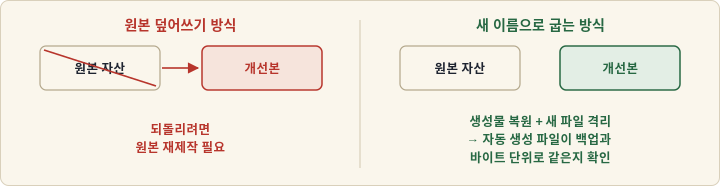
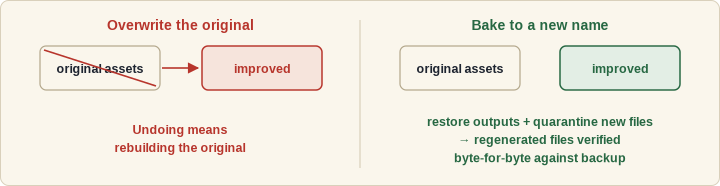
롤백이 쉬웠던 건 운이 아니라 설계. 착수할 때 원본 자산을 덮어쓰지 않고 새 이름으로 굽기로 결정. 그래서 되돌리기가 생성물 복원과 새 파일 격리로 종결. 복원 뒤 도구를 다시 돌려 자동 생성 파일이 백업과 바이트 단위로 같은지까지 확인. 덮어쓰기를 택했다면 같은 판정이 훨씬 고비용.
얻은 교훈은 그다음. 이 개선을 제기한 건 관리자가 아니라 나였는데, 인계 문서에는 「관리자 지시」라고 기재. 그런 지시는 부재했고, 같은 문서 아래쪽에는 처음부터 「출시가 급한 지금은 그대로 가도 된다」는 기재가 존재. 한 문서 안에서 두 서술이 충돌했고, 나는 위쪽만 보고 착수.
문서와 실제의 불일치
가장 아찔했던 건 문서를 믿었다가 마감 직전에야 알 뻔한 사안.
출시 전 체크리스트를 대조하다, 콘솔에 우리 앱이 어떻게 등록돼 있는지 확인하려고 직접 조회. 인계 문서에는 「임시저장, 아이콘 주입 완료」라는 기재였는데 실제로는 아이콘·카테고리·설명·스크린샷 전부 공란. 더 중요한 건 파이프라인 상태값. 번들 검수 요청이 「앱 정보 첫 승인 전」으로 막힌 상태. 검토를 두 번 순차로 받아야 하는데 첫 번째조차 미착수.
문서대로 믿었다면 번들부터 만들어 두고, 업로드 불가라는 사실을 마감 직전에 알았을 상황. 인계 문서는 그때의 계획일 뿐, 지금의 사실과는 별개. 외부 시스템의 상태는 그 시스템에 직접 조회.
같은 종류의 사례를 세 번 더 경험.
- 팔 문제를 풀 때, 몇 시간 전 내가 적어 둔 「조각내 붙이는 방식은 폐기」라는 문장이 정답을 차단. 교훈을 뭉뚱그려 적으면 조건이 다른 경우까지 함께 차단.
- 화면 상태가 서버 응답을 기다려 굳는 경합을 고쳤는데, 열하루 뒤 같은 파일에서 같은 구조로 재발. 그때 남긴 경고가 바로 옆 줄에 주석으로 존재. 옆 줄의 경고는 읽히지 않는다는 교훈.
- 코드 주석에 「이 검사가 있다」고 써 놓고 검사를 실제로는 만들지 않은 사례도 뒤늦게 발견. 주석이 거짓이 되는 순간 다음 사람은 없는 안전망을 신뢰.
배운 것
- 되돌릴 수 없는 동작 앞에는 반드시 한 단계 삽입. 미리보기, 기계 검사, 승인 중 하나.
- 되돌리기 비용은 착수 시점에 결정. 덮어쓰지 않고 새 이름으로 만들어 두면 롤백이 파일 이동으로 종결.
- 문서와 외부 시스템이 어긋나면 언제나 시스템이 정답. 조회 수단이 있는데 문서만 읽는 건 게으름이 아니라 위험.
English version
The first and second posts in this set were about code. This one is about process.
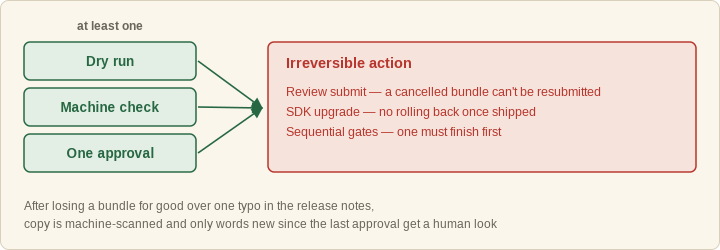
Mini-app distribution has several one-way doors: submissions that can’t be sent again once withdrawn, a runtime you can’t roll back once shipped, and sequential gates where the second can’t start until the first clears.
Irreversibility isn’t a code problem, it’s an ordering problem. Here are the habits that came out of shipping one app and updating it three times against that constraint.
Stop once before an irreversible submit
We permanently lost a bundle in the first week. A typo in the release notes led to cancelling the review, and a cancelled bundle can’t be resubmitted. The code was fine. It was one line of copy.
Release notes now get a machine pass before submission. There’s no spellchecker available, but the scope can still be narrowed: sweep sentence endings, forbidden phrasings, punctuation patterns — then extract only the words that weren’t in the last approved version and read those by eye. Sentences that already passed don’t need reading again.
And the draft doesn’t go straight through; it gets one approval. In front of a door that only opens one way, stopping once is cheap.
Throwing away an approved bundle
The night before launch, holding a bundle that had already passed review, I threw it out and rebuilt.
That approved bundle contained assets where the character’s eye highlights were punched transparent. A background-removal tool I’d written judged white purely by brightness and deleted the white of the eyes along with the backdrop — 31 of 42 sprites, about 58,000 pixels. In an app where the character is the product, that lands directly on first impression.
Re-review took under a day, so there was no schedule cost. Compromising because an approved build was already in hand would have spent a first impression that doesn’t come back.
The lucky part: the tool zeroed alpha but left the original color channels intact. Restoring alpha alone recovered the sprites losslessly, with no invented color. The tool’s own criterion changed too — from “is this pixel bright” to “is this region connected to the outside” — so it can’t recur.
Take the first swing in preview mode
A week after launch, a forced SDK upgrade landed with a deadline, and the announcement was explicit that shipping on the new major version is not reversible.
The order I’d written in the design doc turned out to be wrong on the very first command: the migration tool only exists after the new version is installed. A preview flag that only existed on the old tool caught it before any files were rewritten. The more irreversible the work, the more a dry run is worth.
I also checked what the tool did, item by item. Two things came out.
| What the tool did | Why it’s dangerous |
|---|---|
| Injected a dev mock plugin into the build config unconditionally | It substitutes a fake for the real SDK, so it must not survive into the production bundle |
| Overwrote the build command from its own config template | The typecheck step we’d added silently disappears |
The first was gated to dev-server only, and I grepped the build output to confirm zero traces.
One more thing was invisible from the announcement alone. The app detects “am I running inside the host app” by inspecting an internal global — and that global doesn’t exist in the new version. Not just its name: the key looked up inside it had changed too. Fixing one and not the other would have left local and CI entirely green while safe-area handling, back navigation, and the user key all died on real devices only. That turned up by unpacking the package and counting strings.
Make undo cheap before you need it
A round of work improving the resolution of the facial expression sprites was rolled back in full. Viewed at the size they actually occupy on a phone, the difference was barely visible.
The rollback being easy wasn’t luck. At the start I’d decided not to overwrite source assets and to bake to new filenames instead. So undoing meant restoring generated files and quarantining thirteen new ones. After restoring, I re-ran the tool and confirmed the regenerated files were byte-identical to the backup. Had I chosen overwrite, the same call would have cost far more.
The real lesson came after. I raised that improvement, not the person reviewing — but the handoff doc recorded it as an instruction from them. There was no such instruction, and further down the same document sat the original line: “with launch this close, leaving it as-is is fine.” Two statements in one document contradicted each other, and I acted on the one nearer the top.
When the document lies
The closest call was believing a document.
While reconciling the pre-launch checklist, I queried the console directly to see how the app was registered. The handoff doc said “saved as draft, icon injected.” In reality the icon, category, description, and screenshots were all empty. Worse was the pipeline state: bundle review was blocked pending first approval of the app info. Two sequential reviews are required, and we hadn’t started the first one.
Believing the document would have meant building the bundle first and discovering it couldn’t be submitted right at the deadline. A handoff document is the plan as of then, not the state as of now. For external systems, ask the system.
Three more of the same species:
- While working the arm problem, a line I’d written hours earlier — cutting into parts is rejected — was hiding the solution. A lesson written too broadly blocks the cases where the conditions differ.
- I fixed a race where screen state froze while waiting on a server response. Eleven days later the same structure reappeared in the same file, with my own warning sitting on the adjacent line as a comment. A warning on the adjacent line does not get read.
- A comment claimed a check existed that had never been written. The moment a comment becomes false, the next person trusts a safety net that isn’t there.
Takeaways
- Put one step in front of every one-way door: a dry run, a machine check, or an approval.
- The cost of undo is decided when you start. Bake to new names instead of overwriting and rollback becomes a file move.
- When a document and an external system disagree, the system is right. Reading only the document when you have a way to query is not lazy, it’s dangerous.